
Frequently Asked Questions
Quick answers to common questions about using the AI Fixture Creator.
Q: I upload a PDF, but I get a generation error. What should I do?
A: Some PDF files may fail to read for several reasons: the file size is too large (tens of megabytes), there is DRM protection, the manual uses custom Chinese fonts that break text extraction, or the source file from the manufacturer is simply corrupted.
Solution: Take screenshots or photos of the DMX address table directly from your screen. Save them in JPG format and upload them to the generator. The system recognizes images perfectly!
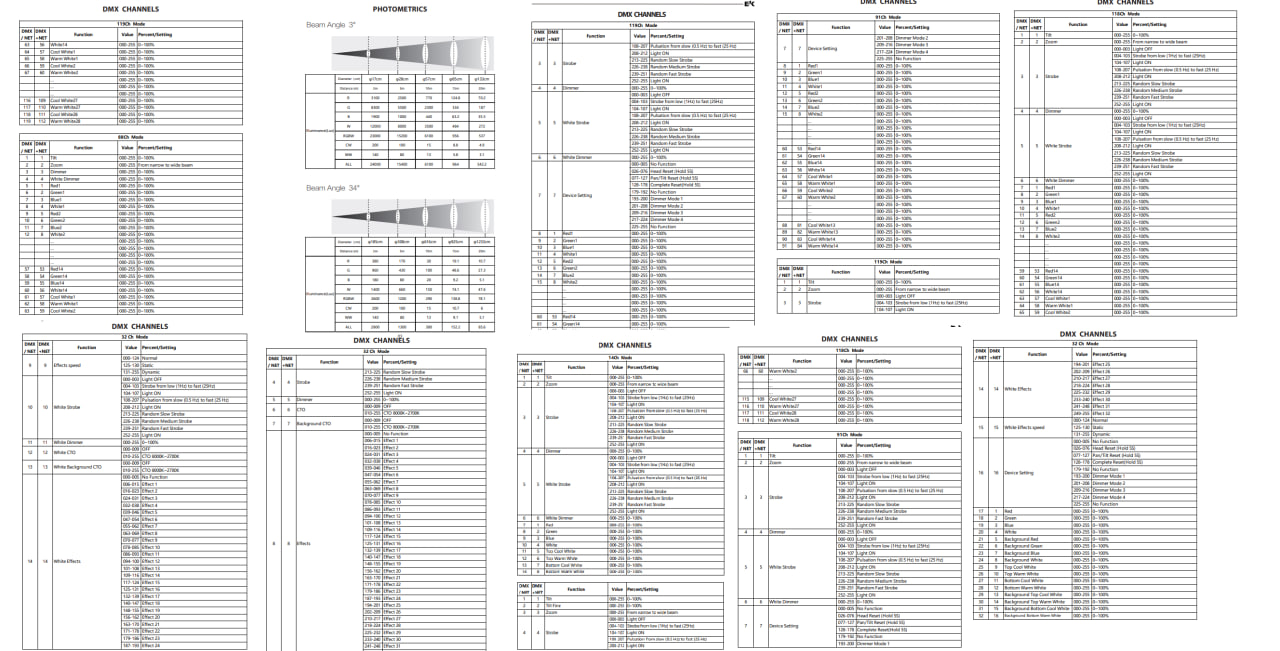
Fig 2. Ideal format: just the channel table in JPG (tablica.jpg)
Q: Will HOG 4 consoles be supported?
A: No, direct file generation for the Hog 4 console family is not supported and is not planned for the foreseeable future.
High End Systems' library format is closed and strictly proprietary. The OS developers encrypt the libraries and do not provide compilation keys to third-party projects. Creating a working file bypassing their official software is technically impossible. We recommend using the built-in Fixture Builder on the console itself.
Q: Will there be support for ChamSys consoles?
A: Support for ChamSys MagicQ consoles already exists through universal GDTF format files! Generation of the old proprietary .hed format will not be supported.
Q: Sometimes the generated fixture doesn't work correctly. Why?
A: Yes, in some cases this is possible. If a "Frankenstein" type device has a very complex, non-standard, or confusing channel structure (which is often the case with budget Chinese devices), even a neural network may not always be able to assemble the perfectly correct logic on the first try.
But even in this case, the AI significantly simplifies your work! It will automatically create hundreds of necessary channels, DMX ranges, wheels, and presets. You will only need to slightly adjust the profile manually, which will take a couple of minutes instead of hours of monotonous work.
Q: I paid but didn't receive an email with the files. What should I do?
A: Don't worry, your fixture is not lost! Immediately after successful generation, it is automatically published in our public database.
Solution: Simply go to the Fixture Library. Your generated fixture will be the very first one on the list. You can open it and download the files for your console at any time.