DOCS / SHOWBEATSYNC /
Program Interface
Interface
Program Interface
Logical blocks designed for the fastest possible access to functions during live performances.
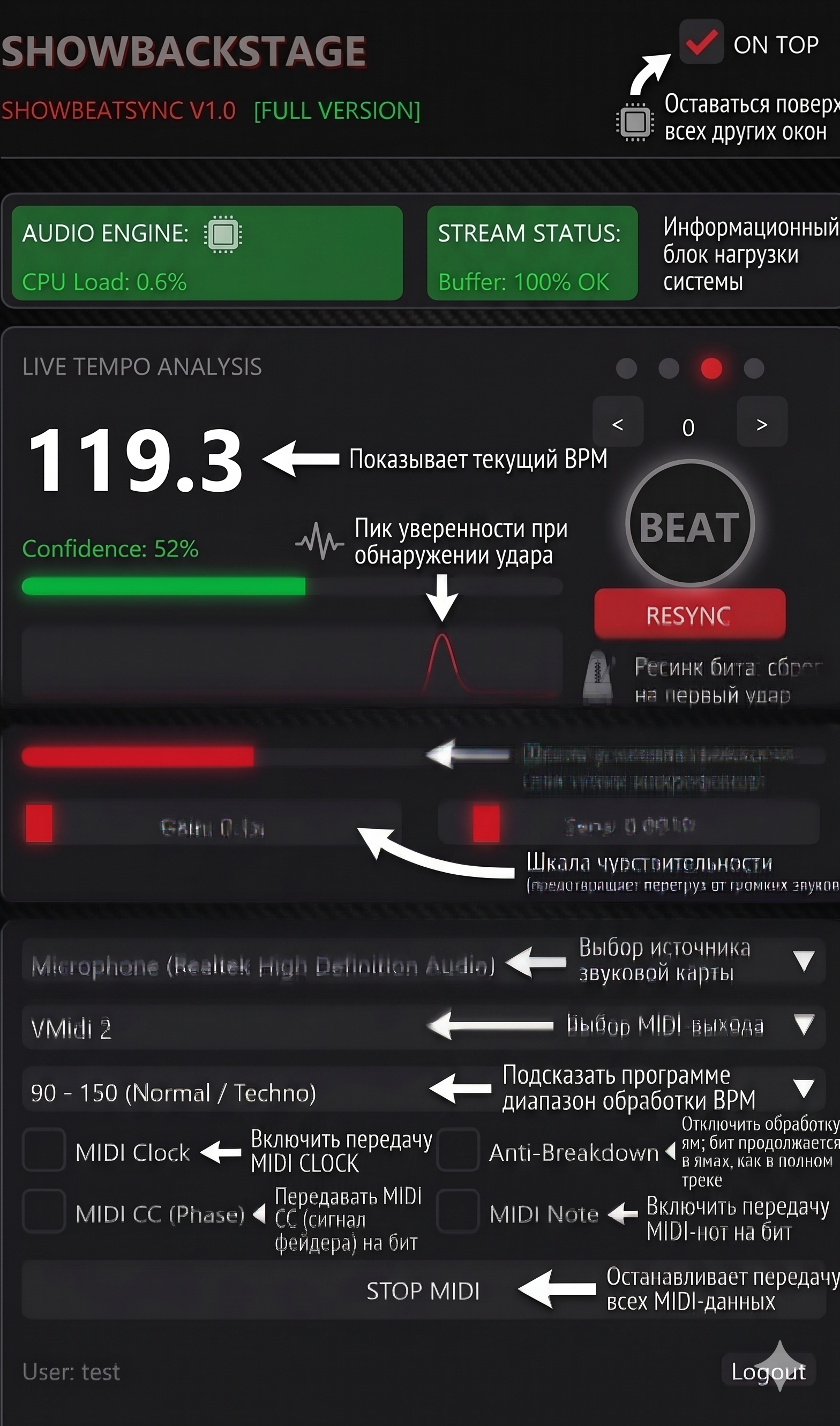
1️⃣ Top Panel (Status)
- License Indicator (FULL VERSION / DEMO): Shows the current status of your program. In demo mode, a session countdown is also displayed here.
- On Top: Activating this checkbox pins the SHOWBEATSYNC window on top of all other programs (e.g., on top of Resolume or grandMA onPC).
2️⃣ TELEMETRY (System)
- CPU Load: Shows how much processor resources the spectral analysis algorithm consumes.
- Buffer: Audio stream state. If the value drops below 100%, your sound card cannot deliver audio without interruptions.
3️⃣ LIVE TEMPO ANALYSIS
- Central Digits (BPM): The currently calculated tempo. If the audio drops out, "PAUSE" will appear here.
- Confidence: A critically important scale.
Green zone (>50%) — the algorithm clearly hears the beat.
Red zone (<46%) — the beat is gone, inertial protection is activated. - BPM Graph: A visual history of tempo changes. Helps to see how the DJ smoothly accelerates the track.
- Beat Indicators (4 dots): Light up red on each beat, counting out a standard bar (1, 2, 3, 4).
- Nudge Buttons (< and >): A micro-phase shift tool by 15 ms backward or forward.
- BEAT (TAP) Button: A large round button for manual tempo setting.
- RESYNC Button: Hard phase restart from the 1st beat.
4️⃣ AUDIO PANEL
- Level Indicator (Volume Bar): During strong kick hits, the bar should color red — signal crossed the threshold.
- Gain: Digital amplifier (from 0.1x to 5.0x).
- Sens (Threshold): Cuts off background noise. Set the slider slightly above the level of quiet track sounds.
5️⃣ SETTINGS (Routing and MIDI)
- Aud (Audio Input): Select your sound card or virtual cable.
- Mid (MIDI Output): Select the port where SHOWBEATSYNC will send signals.
- BPM Range: Set the approximate style of the playing music to protect against tempo doubling errors.
MIDI Generation
- MIDI Clock: Sends standard sync timecode (24 pulses per quarter note).
- MIDI CC (Phase): Sends values from 0 to 127 via CC #1 during each beat. Ideal for linking to LFOs.
- Anti-Breakdown: Enables the "Flywheel Effect" if confidence drops.
- MIDI Note: A keystroke command is sent on each beat.
Session Management
- START / STOP MIDI: The main switch for MIDI broadcasting.
- Logout: Removes the license from this computer.